Reading Time: 4 minutes
Many students panic after submitting an assignment to Turnitin, especially if they uploaded the wrong file, submitted a draft, or later realised their similarity score is high. A common question students ask is whether a paper can be removed from the Turnitin repository and, if so, how this process works.
This guide explains how Turnitin submission deletion really works, who can request it, and what UK students should know—based strictly on Turnitin’s official policies.
Who Can Delete a Submission from Turnitin?
Only Turnitin administrators and, in some cases, instructors (through administrators) can delete submissions.
Students do not have direct access to Turnitin’s repository or deletion tools.
Turnitin allows deletion only through an institutional account, usually managed by:
-
University administrators
-
Academic integrity teams
-
Designated Turnitin account managers
Can Students Remove Their Own Paper from Turnitin?
No. Students cannot delete or remove their own submissions from Turnitin.
Even if:
-
The paper was uploaded by mistake
-
It was a draft version
-
The student owns the work
The student must contact their lecturer or module instructor, who may then request deletion from the university’s Turnitin administrator.
When Is Turnitin Deletion Allowed?
Turnitin allows deletion only in limited, legitimate situations, such as:
-
A wrong file was uploaded
-
A draft or practice submission was submitted by mistake
-
The paper was uploaded to the wrong class or assignment
-
A duplicate submission was created
-
Institutional or data protection (GDPR) reasons apply
Deletion is not guaranteed and depends on university policy and administrator approval.

How Turnitin Submission Deletion Works (Step-by-Step)
Below is a simplified explanation of the official Turnitin process, written in student-friendly language.
Step 1: Instructor Requests Deletion
If allowed by the university, the instructor submits a deletion request to the Turnitin administrator.
They must provide a valid reason (for example, wrong file or test submission).
Step 2: Administrator Reviews the Request
The Turnitin administrator:
-
Logs into the administrator account
-
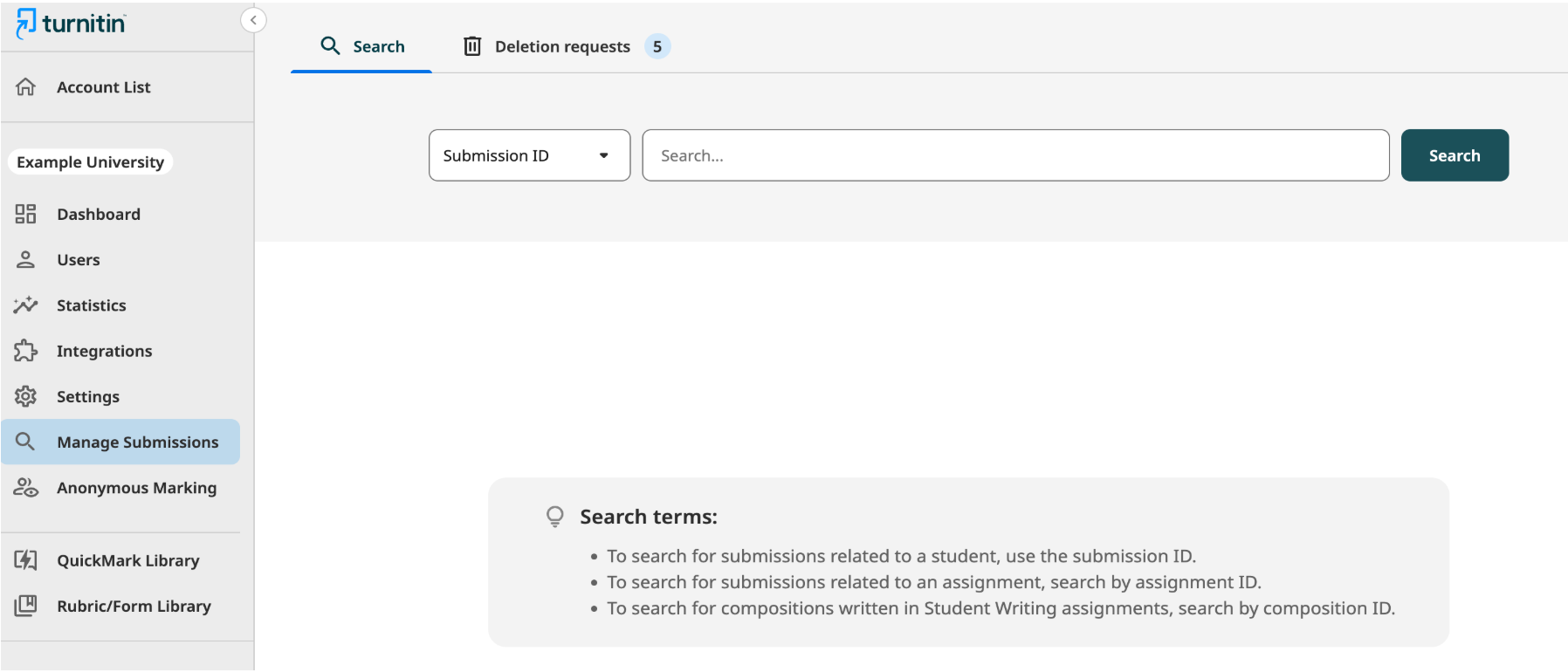
Opens Manage Submissions
-
Reviews the reason provided by the instructor
They can approve or reject the request.
The Manage Submissions Screen is Shown Below.
Step 3: Administrator Approves or Rejects
If Approved:
-
The submission is permanently deleted
-
It is removed from:
-
The student’s assignment
-
The instructor’s records
-
Turnitin’s repository
-
-
The paper will not match future submissions
-
Any existing Similarity Reports must be refreshed
If Rejected:
-
The submission remains in Turnitin
-
The instructor may request deletion again if needed
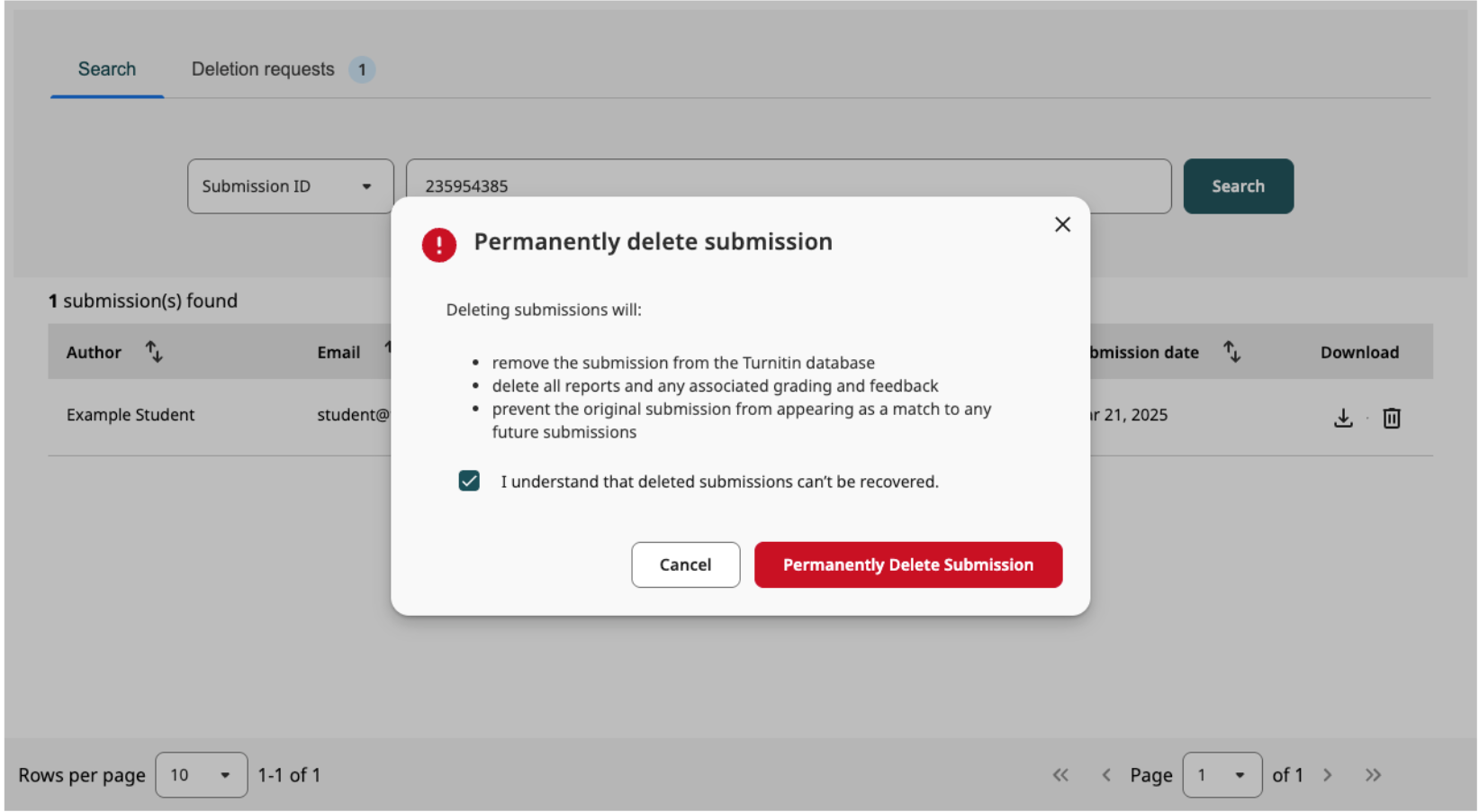
The Permanently Delete Submissions Screen is Shown Below.
Step 4: Permanent Deletion (Important Warning)
Once deleted:
-
The submission cannot be recovered
-
All reports, grading, and feedback are removed
-
The deletion is final
Turnitin clearly states that deletion is permanent.
What Happens After a Submission Is Deleted?
After deletion:
-
The paper no longer exists in Turnitin’s database
-
It will not appear as a match in future Similarity Reports
-
If it appeared in an older report, that report must be refreshed
Deletion does not automatically improve grades or remove academic concerns raised earlier.
Important Things Students Must Understand
Before requesting deletion, students should know:
-
Deletion is rare, not routine
-
Approval depends on institutional rules, not student preference
-
High similarity alone is usually not a valid reason
-
Deletion does not erase academic misconduct decisions already made
Universities focus on learning and academic integrity, not repository manipulation.
What Should Students Do If They’re Worried About Similarity?
Instead of focusing on deletion, students should:
-
Understand the Similarity Report properly
-
Improve paraphrasing and academic writing
-
Check referencing accuracy
-
Use pre-submission quality checks before final upload
These steps are more reliable and academically safe.
Academic support services can help students reduce unintentional similarity, improve clarity, and strengthen academic language, all within university guidelines.
How Academic Support Can Help (Ethical Use)
Academic Universe provides ethical academic support to help students:
-
Understand Turnitin Similarity Reports
-
Improve paraphrasing and referencing
-
Refine drafts before submission
-
Conduct pre-submission quality checks
All support is provided for educational and reference purposes only, in line with UK university academic integrity standards.
Students can contact Academic Universe via the website or WhatsApp for confidential guidance.
Students who are concerned about similarity are encouraged to focus on improving paraphrasing, referencing, and academic clarity rather than deletion, which is where our Originality and Similarity Improvement Support can help.
Frequently Asked Questions (FAQs)
Can Turnitin remove a paper automatically?
No. Removal is manual and handled by university administrators only.
Does deleting a paper reset similarity scores everywhere?
It removes the paper from Turnitin’s database, but past academic decisions remain with the university.
Can I request deletion directly from Turnitin?
No. Requests must go through your lecturer or university.
Is deletion allowed for final submissions?
Usually no, unless there was a genuine error or institutional reason.
Is it better to delete or rewrite?
In most cases, rewriting and improving academic quality is safer and more effective.
Final Note
This article is for educational and reference purposes only. Policies may vary by institution. Students should always follow their university’s academic integrity guidelines.
The guidence is as per Turnitin Directions.